web analytics

Tag: karaoke

  • National Karaoke Week is the fourth week of April!

    Until today, I had no idea there was such a thing as National Karaoke Week…

    If you’ve been reading my posts here on PopRockNation, you might know that I really enjoy karaoke. It’s not just because I enjoy singing, though. It’s because when it’s done right, karaoke can be a lot of fun and a great way to meet people who love music. Sure, people tend to do karaoke in bars, where there’s a lot of drinking and, depending on the place, things can get kind of sketchy. But karaoke can also be a fun, wholesome activity. Why, minus the booze, even kids can do it!

    Karaoke can be a fun way to be exposed to new music and bond with friends. It can also make for a great dare. It’s said that many people have a fear of public speaking. I’m willing to bet that even more people are afraid to sing in public. But if you manage to do it and the crowd is friendly and encouraging, it can be an excellent way to get a totally natural adrenaline rush. My poor husband, Bill, is not a singer, but I managed to get him to perform “Detachable Penis” by King Missile in front of a bunch of his peers. He still loves me, anyway! That song, by the way, is perfect for people who don’t sing and have no issues saying the word “penis” in public.

    The first time I ever sang karaoke was when I was in college. It was sometime in the early 1990s, when a good friend and I stumbled into Sunny’s Cafe and Bar in Farmville, Virginia. They had karaoke every Thursday night. There was a one dollar cover charge. I was too young to drink alcohol. That didn’t stop me, of course. I just imbibed before my arrival. My friend Chris and I sort of became regulars and it was a fun way to blow off steam on Thursday nights. To this day, Thursday still has sort of a party mystique at my house. It’s probably a good thing I don’t have any kids.

    These days, I don’t get to do much karaoke in bars anymore. But I can still celebrate National Karaoke Week this fourth week of April, 2013. In fact, I can celebrate all month, since SingSnap.com just announced a contest they’re having to celebrate National Karaoke Week for the rest of April.

    They’re throwing a contest that anyone who is a member of SingSnap can enter. There are several prizes; the grand prize is a lifetime gold membership to SingSnap.com. Given that SingSnap currently charges $80 per year and $15 per month of unlimited storage of recordings and unlimited access to its song catalog, a lifetime gold membership is a pretty good deal. You don’t have to be a great singer to enter, either. They’re looking for creativity and people who can make a song their very own.

    I’m not sure if I will take part in this particular contest. I’m a bit camera shy, and I have a feeling SingSnap’s contest will require that I make a video that actually shows me singing on camera! That will require me to get dressed up and– horrors!– wear makeup! And God forbid if I have to dance, too! I don’t mind singing in public if I don’t have to watch the end result on camera. But if you’re a karaoke fan and feel like celebrating, by all means join in the fun! SingSnap.com is free to join, though if you want access to all the songs on the site, you’ll want to get a gold membership.

    As for me, all this karaoke on SingSnap has inspired me to experiment with Garage Band, an Apple program I’ve had on my Mac since I bought it in October 2010, but have only just now started to play with. I recorded a couple of songs yesterday and made videos to go with them… neither of which show me on camera! I don’t know if I’ll ever use these new media skills for anything but personal enjoyment, but it’s always fun to learn new things!
  • The secret to singing online…

    The secret to singing online is having a really good microphone…

    I’m posting today because I got a question on SingSnap from someone who had read my last post and heard the huge difference between the way the two songs sounded. He wanted to know my secret to singing online! It’s simple, really. You need a good microphone.

    Compare the two recordings…

    The first video was done using my computer’s built in microphone. I use an iMac computer which, until a couple of days ago, did not have an external mic. Actually, I was pretty surprised that the first video sounded as good as it did. I didn’t expect good sound quality with the internal mic. Before I got my iMac, I used a PC that had a $10 external microphone. Again, it wasn’t bad, but I sure did miss singing into a “real mic”. The second video was done using a basic, but professional grade, Shure SM58 external microphone.

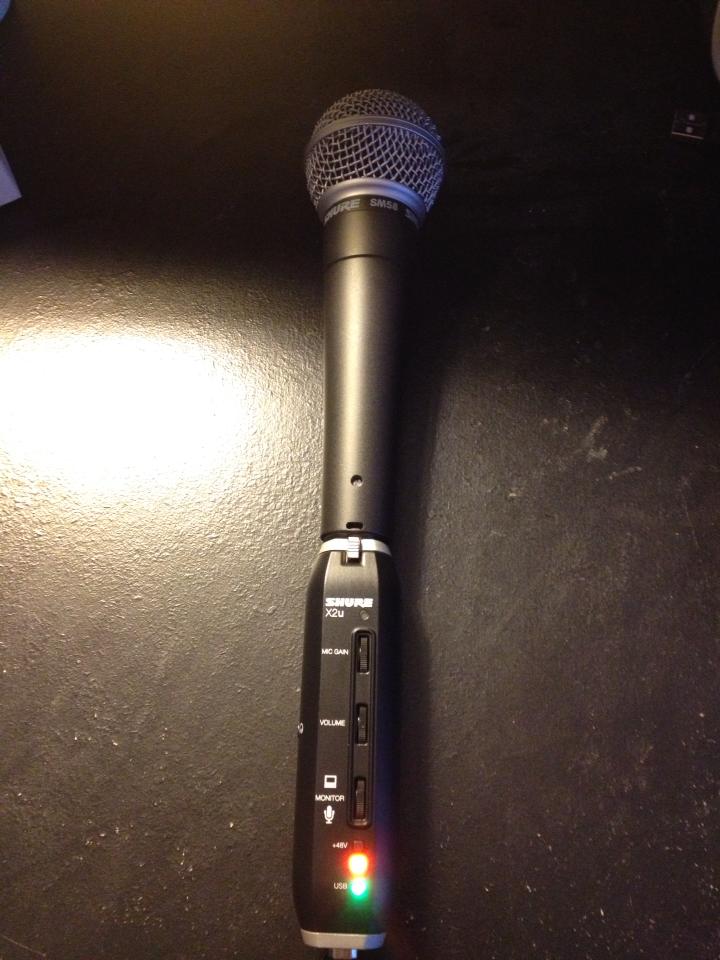
    After listening to a couple of my karaoke performances with my computer’s built in mic, I determined that it would be worth it to purchase an adapter that would allow me to plug in the Shure SM58 microphone I use with my karaoke machine at home. My computer requires peripherals that connect with USB cables. The microphones I use offline connect to cords that attach to my karaoke player with regular jacks. Since my computer did not have a place to plug in the regular cords, I needed to invest in a XLR to USB adapter.

    Off I went to Amazon.com, where I managed to find a Shure XLR-to-USB Signal Adapter. It was selling for $99. I went ahead and bought a desk stand and pop filter as well (thanks, Amazon suggestive selling!), although I probably don’t need them at this point. The adapter plugs easily into the USB port on the back of my computer and it’s simple to attach the microphone to the business end of the cord. The adapter is also good to have because it has a volume and monitor control, as well as a jack for headphones.

    The external microphone I’m now using is why my later recordings sound so much cleaner, clearer, and just plain BETTER than the earlier ones do. The model of microphone I use is Shure’s basic model, currently selling for $98. It’s nothing fancy, but it’s well made and solid quality. It’s important to bear in mind that the Shure microphone doesn’t come with a cord. A basic cord that plugs into a karaoke machine costs anywhere from $15-$20, but if you just want to use the mic for online singing, you’re probably best off just getting the adapter, which includes a cord that will connect to your computer.

    One thing the microphone doesn’t do when it’s hooked up to the computer is amplify. When I use it offline with my karaoke player, my voice is amplified, which I miss with the online karaoke experience. Perhaps my next purchase will be a new set of external speakers!

    Another odd effect is that for some reason, when I record while using this microphone, the music and my voice can get a bit out of sync. SingSnap.com does have settings that allow users to edit the recording so the syncing can be fixed. The internal mic does not cause the syncing problem, but I think the vastly superior quality of the recordings are well worth dealing with lagging and spending a few minutes editing.

    You can probably find less expensive mics and adapters online. I prefer Shure products because they are very high quality and hold up to a lot of abuse.

    I want to thank everyone who listened to the songs I posted last week of my karaoke exploits on SingSnap.com. I’ve gotten some very nice comments that have done a lot to boost my self-esteem. It was a lot of fun writing that article and rediscovering how much I still enjoy karaoke!

    The Shure SM58 with the XLR to USB Signal Adapter...
    The Shure SM58 with the XLR to USB Signal Adapter…